Email Hosting
Hosttier Email Hosting Quickstart Guide
1) Get Your DNS Records
After purchasing your Email Hosting plan, go to Dashboard → My Services, select your Email Hosting service, and click View Details.
Open the DNS Records section to view all the DNS records required for your domain. Keep this page open or copy the records, as you'll need them in the next step.

2) Add DNS Records to Your Domain
Go to Dashboard → My Domains → Manage DNS and add all of the DNS records shown in the DNS Records section of your Email Hosting service.
Save the changes once all records have been added correctly.

3) Verify Your Domain
Our system will automatically check your DNS records and verify your domain.
Your domain will remain in Pending Verification until all required records are detected. Verification usually completes within a few minutes, although DNS propagation may take longer depending on your DNS provider.
Once verification is successful, your email hosting service will become active.
4) Create Email Accounts & Aliases
After your domain has been verified, log in to your Email Hosting Control Panel.
From the Accounts section, you can create email accounts, aliases (forwarders), reset passwords, and manage mailbox settings.
5) Access Webmail
You can access your mailbox using the webmail interface with your email address and password.
You may also use your custom mail hostname (such as mail.yourdomain.com) once DNS propagation is complete and an SSL certificate has been issued.
6) Configure Your Email Client (SMTP/IMAP/POP3)
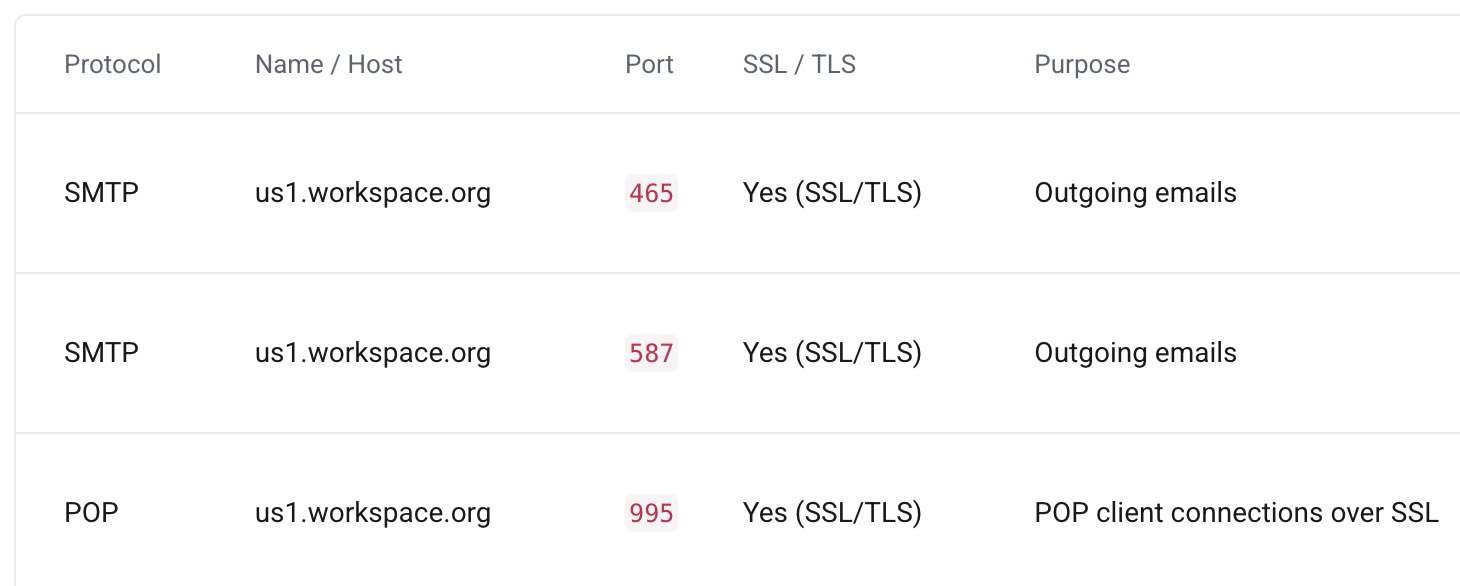
To use your email with Outlook, Thunderbird, Apple Mail, Gmail, iPhone, Android, or any other email client, configure your account using the following settings:
- Hostname:
us1.workspace.org - Username:
your-email@yourdomain.com - Password: Your email account password
After entering these details, your email client will automatically connect to the mail server. If your email client requests additional settings, refer to the Connection Guide available in your Email Hosting dashboard for the correct IMAP, POP3, SMTP ports, and SSL/TLS configuration.